
Known limitations when running online
Use of custom Python code
When running experiments online, PsychoPy converts (transpiles) Code
Components written in Python into JavaScript so they can run in the web
browser.
In many cases this conversion works automatically, but there are important limitations to be aware of.
How code components are translated
PsychoPy attempts to translate individual Python statements and functions into their JavaScript equivalents.
Common Python operations (e.g. arithmetic, logic, list indexing, simple functions) usually translate successfully.
However, entire Python libraries cannot be translated.
In particular, Python packages such as numpy, scipy, or pandas are
not available online, even if they work locally.
What will not work online
The following will cause errors when running online:
Importing Python libraries (e.g.
import numpy as np)Calling library-specific functions (e.g.
np.average(),np.random())Relying on Python-only data structures or file system access
Even if such code runs locally, it cannot be translated into JavaScript.
Recommended approach
To maximise compatibility:
Use built-in functions wherever possible (e.g.
average()instead ofnp.average())Keep Code Components simple and explicit
Avoid imports in Code Components
If you need a specific function that is not automatically translated:
Add a Code Component
Set the Code Component type to “JS”
In the Begin Experiment tab, define a custom JavaScript function
Call this function later in your experiment (e.g. in Each Frame or Begin Routine)
Example workflow
Define a custom function in the JS code (Begin Experiment)
Use that function elsewhere in your experiment as needed
Keep all browser-specific logic in JavaScript
This approach gives you more control and avoids unexpected translation errors.
Further resources
You may find the following Python-to-JavaScript crib sheet helpful:
Note that this resource was written for older versions of PsychoPy. Many aspects of Python-to-JavaScript translation have improved since then, but the examples may still be useful for understanding common patterns and pitfalls.
File system access (“Unknown Resource Error”)
Unknown Resource Errors often occur when your experiment tries to access files that are not available online. This can happen if you have files (images, sounds, spreadsheets) presented based on logic (e.g. if in group 1 show this file). To avoid this error, ensure that all files your experiment needs are included in the resources when you export your experiment for online use. You can do this in the Experiment Settings under the Online tab in Builder.
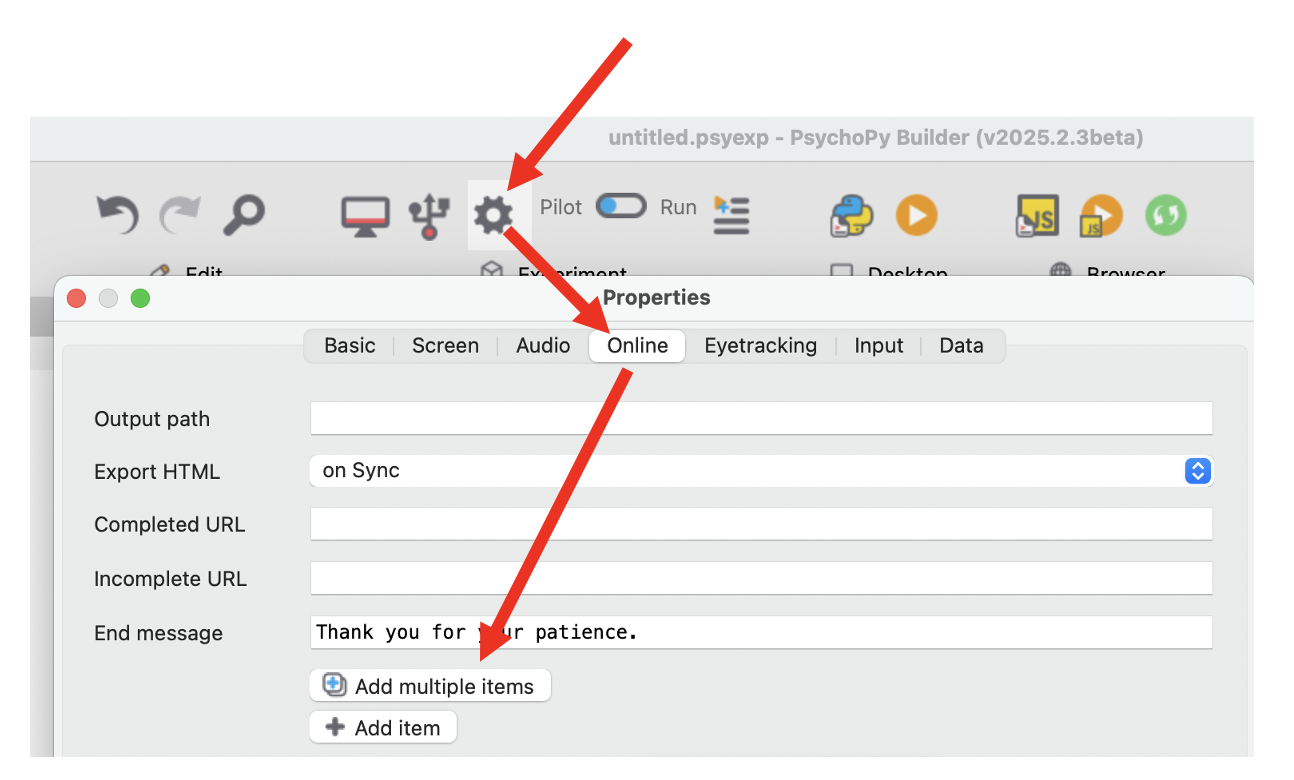
Buttons used to add resources to an online experiment in PsychoPy Builder.
Next step
Return to: