
Check whether your experiment can run online
Goal: Make sure your experiment uses components and features that are supported when running online.
Before you start
You should already have:
PsychoPy installed
A basic PsychoPy experiment created in Builder (or a clear design in mind)
What this step covers
In this step, you will:
Review which PsychoPy components are supported online
Identify common features that require modification
Decide whether your experiment needs changes before continuing
Supported features
Not all PsychoPy components work online. In particular, any hardware components (EEG or eye trackers) will not function, though some eyetracking can be achieved with external plugins such as WebGazer.js. For an example of using WebGazer in a Pavlovia experiment, see the Eye Tracking Face Preference demo. You can also download the experiment files from the GitLab repository.
When creating your experiment in PsychoPy Builder, you can choose to selectively display components that will work online by selecting the filter icon next to “Get more” on your component panel and selecting PsychoJS (online).
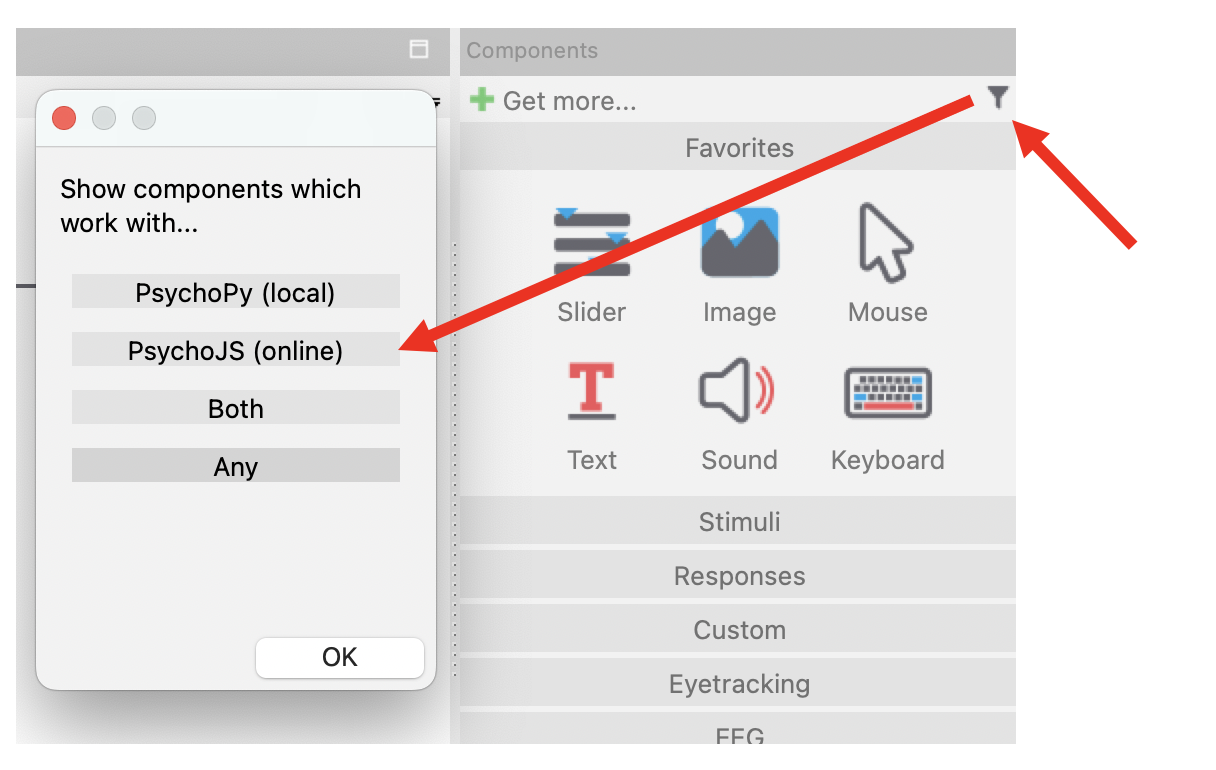
Fig. 12 Buttons used to filter components for online use in PsychoPy Builder.
See: Status of online options for a full list of supported components.
Common limitations
Some features require special attention when running online:
Use of custom Python code
File system access (“Unknown Resource Error”)
Large media files (images, audio, video)
If your experiment uses these features, read: Known limitations when running online
Next step
Once you know your experiment can run online, continue to: